
Views: 222 Author: Leah Publish Time: 2025-03-09 Origin: Site


Content Menu
● Introduction to Wi-Fi Signal Indicators
>> How Wi-Fi Signal Indicators Work
● Wi-Fi Signal Strength Measurement Tools
● Optimizing Wi-Fi Signal Strength
>> 1. What Does the Number Next to the Wi-Fi Symbol Mean?
>> 2. How Do I Measure Wi-Fi Signal Strength?
>> 3. What Is a Good Wi-Fi Signal Strength?
>> 4. Why Do Devices Show Different Signal Strengths?
>> 5. How Can I Improve My Wi-Fi Signal Strength?
The Wi-Fi signal indicator is a crucial component of modern devices, providing users with a visual representation of their wireless connection's strength. This indicator is often displayed as a series of bars or a percentage, giving users an idea of how strong their signal is. However, understanding what these indicators mean and how they relate to actual signal quality can be complex. In this article, we will delve into the world of Wi-Fi signal indicators, exploring their significance, how they work, and how to interpret them effectively.
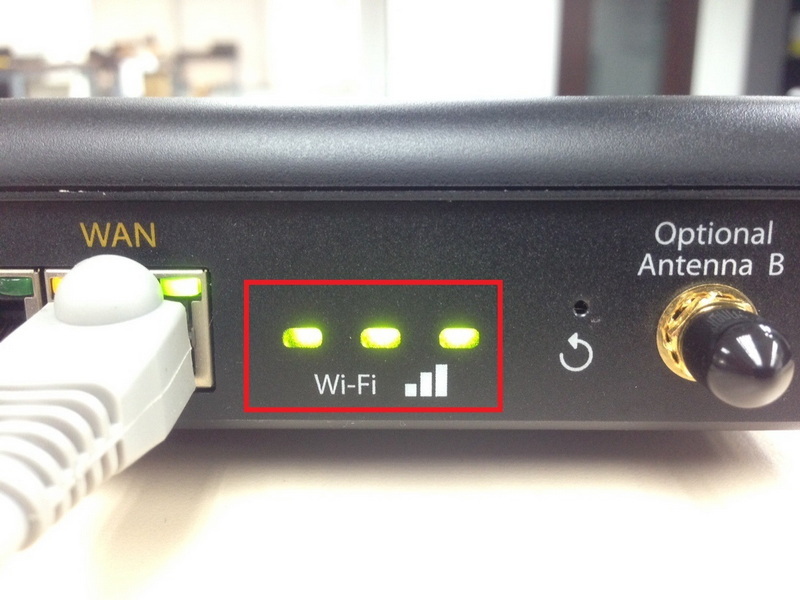
Wi-Fi signal indicators are graphical representations of the strength of your wireless connection. They are commonly seen on devices such as smartphones, laptops, and tablets. The indicator typically consists of a series of bars, with more bars filled in indicating a stronger signal.
These indicators are based on the Received Signal Strength Indicator (RSSI), which measures the power of the signal received by a device. RSSI values are usually expressed in decibel milliwatts (dBm), ranging from -30 dBm (the strongest possible signal) to -90 dBm (the weakest). However, the actual RSSI values are not always directly translated into the number of bars displayed on devices.
RSSI values provide a more precise measurement of signal strength than the visual indicators. Here's a general guide to RSSI values and their corresponding signal qualities:
| RSSI Value | Signal Quality | Suitable For |
|---|---|---|
| -30 dBm | Excellent | Standing next to the router |
| -50 dBm | Very Good | High-bandwidth applications |
| -60 dBm | Good | General internet use |
| -67 dBm | Fair | Basic video streaming |
| -70 dBm | Okay | Web browsing, email |
| -80 dBm | Poor | Basic connectivity, unreliable |
| -90 dBm | Unusable | No reliable connection |
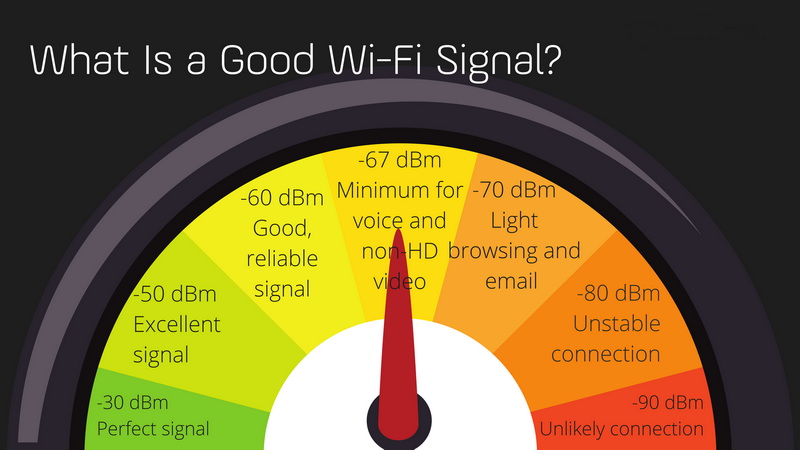
For a more accurate assessment of your Wi-Fi signal strength, you can use specialized tools like Wi-Fi analyzers. These tools provide detailed information about the signal strength in different areas of your home or office, helping you identify where your router is optimally placed.
Wi-Fi analyzers can be downloaded as apps on smartphones or installed on computers. They display signal strength in dBm and can help you map out your network's coverage.
Improving your Wi-Fi signal strength can significantly enhance your internet experience. Here are some tips to optimize your network:
1. Router Placement: Place your router in a central location, ideally elevated and away from obstructions.
2. Update Firmware: Regularly update your router's firmware to ensure you have the latest features and improvements.
3. Switch to 5GHz: If possible, use the 5GHz band for less interference and better performance.
4. Minimize Interference: Reduce interference from other devices by using tools like Wi-Fi analyzers to find the least congested channels.
Wi-Fi signal indicators provide a quick glance at your connection's strength, but understanding the underlying RSSI values and using tools like Wi-Fi analyzers can offer a more detailed insight into your network's performance. By optimizing your router placement and minimizing interference, you can ensure a robust and reliable Wi-Fi connection.
The number next to the Wi-Fi symbol, such as "6," indicates the version of Wi-Fi your device is connected to, like Wi-Fi 6. This is part of a new naming convention that simplifies understanding Wi-Fi standards[1].
You can measure Wi-Fi signal strength using tools like Wi-Fi analyzers, which provide readings in dBm. These tools help identify areas with strong or weak signals[4][6].
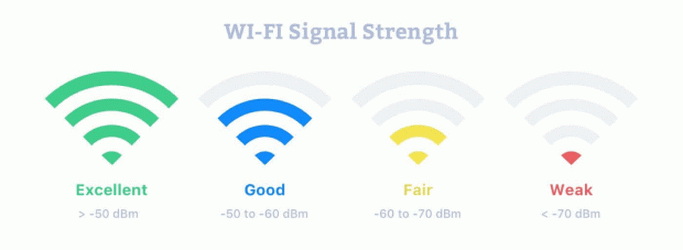
A good Wi-Fi signal strength is generally considered to be between -60 dBm and -50 dBm. This range supports most online activities without significant issues[10][15].
Devices may show different signal strengths due to variations in how RSSI is interpreted and displayed. Factors like device sensitivity and environmental interference also play a role[14].
To improve your Wi-Fi signal strength, ensure your router is centrally located, update your router's firmware regularly, and minimize interference from other devices[12][15].
[1] https://www.cepro.com/networking/what-the-wi-fi-symbol-with-the-6-means/
[2] https://support.google.com/googlenest/answer/6191584?hl=en
[3] https://research.ijcaonline.org/mictdi2016/number2/mictdi201612.pdf
[4] https://www.youtube.com/watch?v=hCxxRr7IzU8
[5] https://www.youtube.com/watch?v=lZf-zUoMUFc
[6] https://www.metageek.com/training/resources/wifi-signal-strength-basics/
[7] https://serverfault.com/questions/501025/industry-standard-for-minimum-wifi-signal-strength
[8] https://ux.stackexchange.com/questions/151991/mapping-wifi-signal-strength-to-5-bar-indicator
[9] https://eu.community.samsung.com/t5/tablets/what-is-the-indicator-next-to-the-wireless-signal-indicator/td-p/6255924
[10] https://eyenetworks.no/en/required-good-wifi-signal-strength/
[11] https://wraycastle.com/blogs/knowledge-base/rssi-signal-strength
[12] https://techgrid.com/blog/wifi-signal-strength
[13] https://automationcommunity.com/wifi/
[14] https://superuser.com/questions/951166/why-do-wifi-signal-indicators-show-rssi-when-everyone-really-wants-to-know-snr
[15] https://www.minim.com/blog/wifi-signal-strength-test-your-guide-to-a-better-wifi-experience
[16] https://www.virginmedia.com/blog/wifi/signal-strength
[17] https://www.screenbeam.com/wifihelp/wifibooster/how-do-you-measure-your-wi-fi-signal-strength/
[18] https://www.youtube.com/watch?v=QxhAe5ajr3c
[19] https://www.freepik.com/free-photos-vectors/wifi-signal
[20] https://www.youtube.com/watch?v=rpEuXwYGI8c
[21] https://www.netgear.com/au/hub/network/wifi-questions-guide/
[22] https://eyenetworks.no/en/wifi-quiz-2023-answer-key/
[23] https://help.keenetic.com/hc/en-us/articles/360010432360-How-do-I-check-the-signal-strength-and-wireless-coverage-of-my-Wi-Fi-router
[24] https://www.reddit.com/r/apple/comments/8sk3u4/is_it_just_me_or_is_the_wifi_signal_strength/
[25] https://www.screenbeam.com/wifihelp/wifibooster/how-to-check-your-wi-fi-signal-strength/
[26] https://www.istockphoto.com/photos/wifi-signal
[27] https://www.vecteezy.com/free-vector/wifi-signal
[28] https://www.youtube.com/watch?v=LqMH0v22asg
[29] https://www.youtube.com/watch?v=Jofzewzp8v4
[30] https://www.istockphoto.com/photos/wifi-symbol
[31] https://www.youtube.com/watch?v=bPJNO3_3qj4
