
Views: 222 Author: Leah Publish Time: 2024-12-30 Origin: Site


Content Menu
● Understanding CATV Signal Amplifiers
● Components Needed for Installation
● Step-by-Step Installation Guide
>> Step 1: Choose the Right Location
>> Step 2: Mount the Amplifier
>> Step 3: Connect the Incoming Cable
>> Step 4: Connect Power Supply
>> Step 5: Connect Output Cables
● Understanding Different Types of Amplifiers
● Choosing the Right Amplifier
● Advanced Features in Modern Amplifiers
● Maintenance Tips for Your Amplifier
● Common Installation Mistakes to Avoid
● The Importance of Proper Grounding
● FAQ
>> 1. What is a CATV signal amplifier used for?
>> 2. How do I know if I need an amplifier?
>> 3. Can I install a CATV signal amplifier myself?
>> 4. Will an amplifier work with all types of signals?
>> 5. How do I troubleshoot my CATV signal amplifier?
Connecting a CATV (Cable Television) signal amplifier can significantly enhance your television viewing experience by improving signal strength and quality. This comprehensive guide will walk you through the process step-by-step, ensuring you understand the necessary components, installation techniques, and troubleshooting tips.

A CATV signal amplifier is a device designed to boost the strength of the incoming cable signal. These amplifiers are particularly useful in situations where the signal is weak due to distance from the source or when multiple televisions are connected in a network.
Key Benefits of Using a CATV Signal Amplifier:
- Improved Signal Quality: Reduces pixelation and improves picture clarity.
- Extended Range: Allows for better reception in areas with weak signals.
- Multiple Connections: Supports multiple TVs without significant signal loss.
Before starting the installation, ensure you have the following components:
- CATV Signal Amplifier: Choose an appropriate amplifier based on your needs (e.g., one with multiple outputs if connecting several TVs).
- Coaxial Cables: These cables will connect your amplifier to the cable source and your TVs.
- Power Supply: Most amplifiers require an external power supply.
- Mounting Hardware: If you plan to mount the amplifier on a wall or shelf.
Select a location for your amplifier that is close to your incoming cable line. Ideally, this should be near a power outlet as well.
If your amplifier requires mounting, use screws and anchors to secure it to a wall or shelf. Ensure it is stable and accessible for future adjustments.
1. Locate the coaxial cable coming from your cable provider.
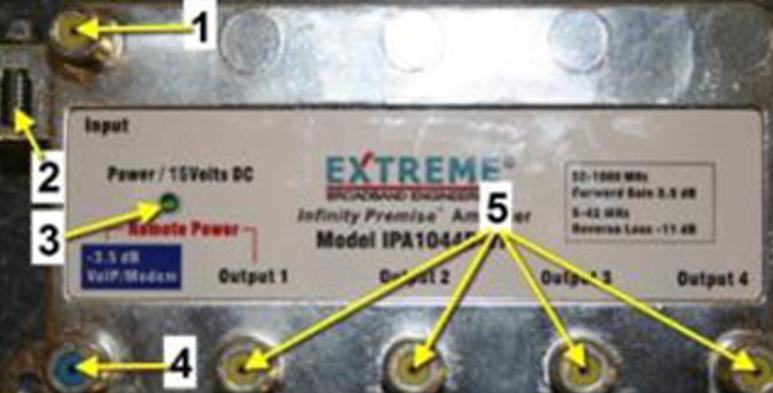
2. Connect this cable to the RF IN port on your amplifier using a coaxial connector.
1. Take the power supply included with your amplifier.
2. Connect it to the POWER IN port on the amplifier.
3. Plug the power supply into an electrical outlet.
1. Use additional coaxial cables to connect each output port of the amplifier to your televisions or other devices.
2. Ensure that each connection is tight and secure to prevent signal loss.
Make sure all connections are properly made:
- Incoming cable is connected to RF IN.
- Power supply is plugged into an outlet.
- Output cables lead to each TV.
1. Turn on your amplifier by plugging it into an electrical outlet.
2. Check for any LED indicators on the amplifier that signify it is powered on.
3. Turn on your TVs and scan for channels to ensure proper reception.
There are primarily two types of CATV amplifiers:
- Preamplifiers: These are installed close to the antenna or incoming signal source and are designed to boost weak signals before they travel through long coaxial cables. They are particularly useful in situations where the distance from the source results in significant signal loss.
- Distribution Amplifiers: These amplifiers are used when splitting a single signal among multiple TVs or devices. They compensate for signal loss caused by splitters, ensuring that each connected device receives adequate signal strength.
When selecting a CATV signal amplifier, consider:
- Gain Rating: This indicates how much amplification the device provides. A higher gain rating is beneficial for weak signals but can lead to over-amplification if too high for strong signals.
- Number of Outputs: Determine how many TVs or devices will be connected. Ensure that the amplifier has enough outputs without compromising performance.
- Frequency Range: Make sure that the amplifier supports both VHF and UHF frequencies if you plan to receive channels from both bands.
Modern CATV amplifiers come equipped with several advanced features that enhance functionality:
- Automatic Gain Control (AGC): This feature automatically adjusts gain levels based on incoming signal strength, preventing over-amplification and reducing noise.
- Noise Filters: Many amplifiers include built-in filters that eliminate unwanted signals and interference, ensuring clearer reception.
- Remote Monitoring and Control: Some high-end models allow users to monitor performance and adjust settings via smartphone apps or web interfaces.
To ensure optimal performance from your CATV signal amplifier:
- Regularly check all connections for tightness and wear.
- Keep the amplifier clean and free from dust or debris that might obstruct airflow or interfere with performance.
- Monitor signal quality periodically; if you notice degradation, consider adjusting gain settings or checking for damaged cables.
When installing a CATV signal amplifier, be aware of these common mistakes:
- Incorrect Placement: Placing an amplifier too far from the incoming signal can lead to inadequate boosting. Ideally, it should be as close as possible to where the cable enters your home.
- Overloading Outputs: Connecting too many devices without considering their total power draw can lead to poor performance. Always check manufacturer recommendations regarding output limits.
- Ignoring Power Requirements: Ensure that your power supply matches the specifications needed by your amplifier. Using an inadequate power supply can cause malfunctioning or reduced performance.
Signal loss occurs when a broadcast signal weakens as it travels through cables or splitters. Factors contributing to signal loss include:
- Cable Length: Longer coaxial cables result in more significant attenuation of signals.
- Quality of Cables: Low-quality cables can introduce more resistance, leading to greater losses.
- Environmental Interference: Physical obstructions like walls, trees, or buildings can weaken signals before they reach your antenna or receiver.
Proper grounding of your CATV system is crucial for safety and performance:
- It helps prevent electrical surges caused by lightning strikes, protecting both equipment and users.
- Grounding reduces interference from external sources, improving overall reception quality.
To ground your system effectively:
1. Use a grounding block where all coaxial cables converge.
2. Connect this block to a suitable grounding rod driven into the earth outside your home.
3. Ensure all components are bonded together with appropriate grounding wire.
Connecting a CATV signal amplifier can greatly enhance your television viewing experience by providing clearer signals and allowing multiple devices to connect without loss of quality. By following this guide, you should be able to install and troubleshoot your CATV signal amplifier effectively while understanding key concepts related to its operation and maintenance.
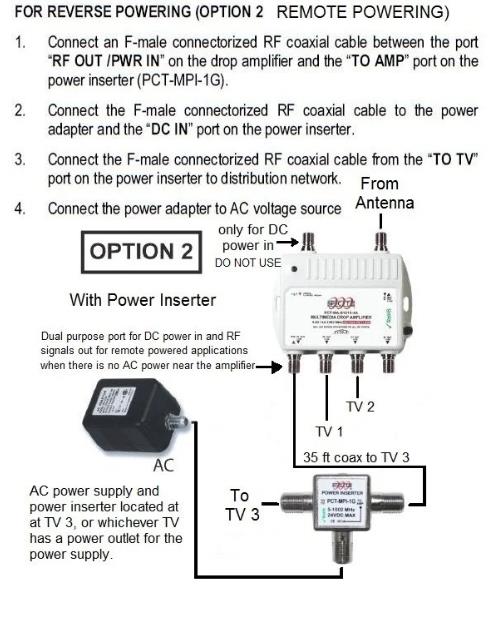
A CATV signal amplifier boosts weak cable signals, improving picture quality and allowing multiple TVs to connect without significant loss of signal strength.
If you experience pixelation or poor reception, especially when connecting multiple TVs, an amplifier may be necessary.
Yes, most installations can be done by following simple steps outlined in user manuals or guides like this one.
While amplifiers are effective for CATV signals, they may not work well with over-the-air (OTA) signals unless specifically designed for that purpose.
Check all connections, ensure power supply functionality, and consider reducing connections if experiencing poor reception quality.
