
English
Views: 0 Author: Site Editor Publish Time: 2026-03-11 Origin: Site


Content Menu
● Understanding CATV Signal Amplifiers
● Types of CATV Signal Amplifiers
● Installation of a CATV Signal Amplifier
>> Step-by-Step Installation Guide
● Optimizing Your CATV Signal Amplifier
● Common Issues and Troubleshooting
● Advanced Considerations for Using CATV Signal Amplifiers
● FAQ
>> 1. What is a CATV signal amplifier?
>> 2. How do I know if I need an amplifier?
>> 3. Can I use an amplifier in a strong signal area?
>> 4. How do I install a CATV signal amplifier?
>> 5. What maintenance does a CATV signal amplifier require?
Using a CATV (Cable Television) signal amplifier can significantly enhance your television viewing experience, especially in areas where the signal strength is weak. This comprehensive guide will walk you through the purpose of CATV signal amplifiers, how to install them, and tips for optimizing their use.
What is a CATV Signal Amplifier?
A CATV signal amplifier is a device designed to boost the strength of cable television signals. It compensates for signal loss that occurs over long cable runs or when multiple devices are connected to a single signal source. By amplifying the incoming signal, these devices help ensure that viewers receive a clear picture and sound.
Why Use a CATV Signal Amplifier?
- Improved Signal Quality: Amplifiers enhance weak signals, reducing pixelation and interruptions.
- Multiple Connections: They allow you to connect several TVs or devices without losing signal strength.
- Long Cable Runs: If your TV is far from the signal source, an amplifier can maintain signal integrity.
1. Distribution Amplifiers: These are used to split and amplify signals to multiple outputs, ideal for homes with several TVs.
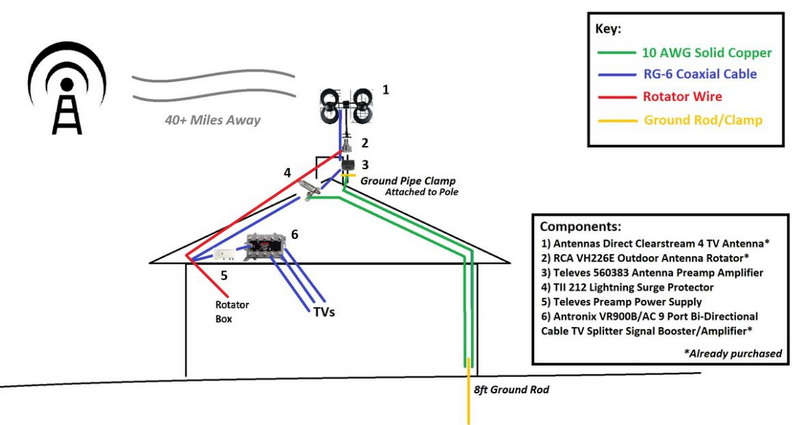
2. Preamplifiers: Installed close to the antenna, they boost weak signals before they travel through long cables.
3. Line Amplifiers: Used in long cable runs to boost the signal strength at various points along the cable.
Tools and Materials Needed:
- Coaxial cables
- CATV signal amplifier
- Power supply (if not powered through coax)
- 75-ohm terminators (for unused ports)
- Mounting hardware (if needed)
1. Choose the Right Location:
- Find a location close to your antenna or where the cable enters your home. Ensure it's accessible for maintenance.
2. Mount the Amplifier:
- Secure the amplifier to a wall or stud using screws or anchors. This step is crucial for outdoor installations to prevent damage from weather conditions.
3. Connect the Cables:
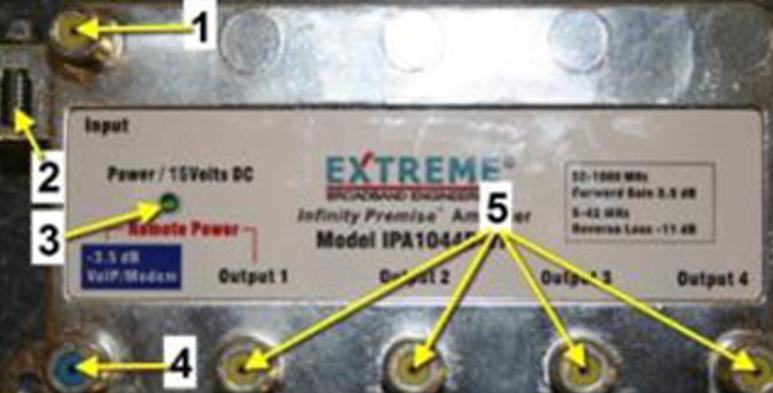
- Connect the incoming coaxial cable from your antenna or cable service provider to the RF IN port on the amplifier.
- Connect another coaxial cable from one of the RF OUT ports on the amplifier to your television or other devices.
- If using a distribution amplifier, connect additional cables from other RF OUT ports to other TVs.
4. Power Connection:
- If your amplifier requires an external power supply, plug it into an electrical outlet. Some amplifiers can receive power directly through coaxial cables, so check your model's specifications.
5. Terminate Unused Ports:
- Use 75-ohm terminators on any unused output ports to prevent signal leakage.
6. Power On and Test:
- Turn on the power supply and check if the power LED on the amplifier is illuminated. Then, test your TVs to ensure they are receiving a strong signal.

1. Adjusting Gain Levels:
Many amplifiers come with adjustable gain settings. If channels are pixelating or dropping out, try reducing the gain slightly; too much amplification can lead to distortion.
2. Avoid Over-Amplification:
In areas with strong signals, using an amplifier may cause more harm than good by overloading the system. If you live in such an area, consider using a passive splitter instead of an active amplifier.
3. Regular Maintenance:
Check connections periodically for wear and tear, especially in outdoor installations. Ensure that all cables are securely connected and free from damage.
- Signal Loss: Check all connections and ensure that there are no damaged cables.
- Interference: Electrical devices near your setup can cause interference; try relocating them if necessary.
- Poor Picture Quality: Adjust gain settings on your amplifier if channels are pixelating or unclear.
Understanding Signal Loss in Coaxial Cables
Signal loss occurs naturally as signals travel through coaxial cables due to resistance in the cable material. The longer the cable run, the more significant the loss becomes. For instance:
- RG59 coaxial cable typically experiences higher loss compared to RG6 over long distances.
To mitigate this issue, always opt for high-quality coaxial cables (like RG6) when setting up your system, especially for longer runs exceeding 100 feet.
Choosing Between Different Types of Amplifiers
When selecting an amplifier type:
- Preamplifiers are ideal if you're located far from broadcast towers and need to boost weak signals before they travel through long distances.
- Distribution amplifiers work best when you have multiple TVs connected but need to ensure that each one receives sufficient signal strength without degradation.
Installation Tips for Optimal Performance
1. Placement Matters: Always install amplifiers as close as possible to the source of the signal (e.g., antenna) rather than at the end of long cable runs. This minimizes noise introduced by long cable lengths.
2. Use Quality Connectors: Ensure that all connectors used in your setup are high-quality and properly secured to prevent any potential loss of signal due to poor connections.
3. Grounding Your System: For outdoor installations, grounding is essential for protecting against electrical surges caused by lightning strikes or static electricity buildup.
4. Sealing Connections: Use weatherproof connectors and enclosures for outdoor installations to protect against moisture and corrosion.
5. Testing Different Configurations: Don't hesitate to experiment with different configurations of your setup—sometimes moving an amplifier just a few feet can yield significant improvements in performance.
Using a CATV signal amplifier can greatly enhance your television viewing experience by improving signal quality and allowing multiple connections without loss of clarity. By following proper installation techniques and maintenance practices, you can ensure optimal performance from your amplifier while enjoying uninterrupted access to your favorite channels.
A CATV signal amplifier boosts cable television signals to improve reception quality, especially in areas with weak signals or when multiple devices are connected.
If you experience pixelation, poor picture quality, or have multiple TVs connected through splitters, an amplifier may be beneficial.
Using an amplifier in areas with strong signals can lead to over-amplification and distortion; consider using a passive splitter instead.
Mount it near your antenna or cable entry point, connect incoming and outgoing coaxial cables, power it on, and test for improved reception.
Regularly check connections for damage and ensure that all cables are secure; adjust gain settings as needed based on reception quality.
[1] https://www.antennasdirect.com/cmss_files/attachmentlibrary/cda4instructions.pdf
[2] https://www.hpmemoryproject.org/an/pdf/an_1288-4.pdf
[3] https://www.anntlent.com/blogs/%E6%96%B0%E9%97%BB/common-issues-with-signal-amplifiers-and-solutions
[4] https://mysignalboosters.com/blog/how-a-signal-booster-can-help-with-cable-tv-reception/
[5] https://www.youtube.com/watch?v=jC98kBXHxhc
[6] https://www.wilsonpro.com/blog/optimizing-your-cell-phone-signal-booster
[7] https://tongda-cable.com/common-catv-coaxial-cable-issues-and-how-to-fix-them/
[8] https://support.channelmaster.com/hc/en-us/articles/200383705-What-Is-a-Distribution-Amplifier-and-Do-I-Need-One-CM-3410-CM-3412-CM-3414-CM-3418
[9] https://www.reddit.com/r/cordcutters/comments/pn3jvo/where_do_you_install_a_line_amplifier_for_ota/
[10] https://www.edaboard.com/threads/hdtv-antenna-amplifier-suggestions.400685/


