Content Menu
● Introduction
● Understanding Load Cells
>> What is a Load Cell?
>> Types of Load Cells
>> How Load Cells Work
● Introduction to HX711
>> What is HX711?
>> Features of HX711
>> Applications of HX711
● Connecting Load Cells to HX711
>> Required Components
>> Wiring Diagram for 4 Load Cells
>> Step-by-Step Connection Guide
● Calibration of Load Cells with HX711
>> Importance of Calibration
>> Calibration Process
● Using Arduino with Load Cells and HX711
>> Setting Up Arduino
>> Reading Weight Data
● Troubleshooting Common Issues
>> Common Connection Problems
>> Calibration Issues
>> Signal Noise and Interference
● Practical Applications of Load Cells and HX711
>> Weighing Scales
>> Industrial Applications
>> DIY Projects
● Conclusion
● Related Questions
>> 1. What is the maximum load capacity of a load cell?
>> 2. How do I choose the right load cell for my project?
>> 3. Can I use HX711 with other microcontrollers?
>> 4. What are the common materials used in load cells?
>> 5. How do I ensure accurate readings from my load cell?
Introduction
Load cells are essential components in various applications requiring precise weight measurement. When combined with the HX711 amplifier, they provide an effective solution for creating accurate weighing scales. This article will guide you through the process of connecting four load cells to an HX711, ensuring you understand the necessary steps and components involved.
Understanding Load Cells
What is a Load Cell?
A load cell is a transducer that converts a force into an electrical signal. It is widely used in weighing applications, where it measures the weight of an object by detecting the deformation caused by the load.
Types of Load Cells
There are several types of load cells, including:
- Strain Gauge Load Cells: The most common type, which uses strain gauges to measure deformation.
- Hydraulic Load Cells: These use fluid pressure to measure weight.
- Pneumatic Load Cells: These measure weight based on air pressure.
How Load Cells Work
Load cells operate on the principle of strain gauges, which change resistance when stretched or compressed. This change in resistance is converted into an electrical signal, which can be measured and interpreted.

Introduction to HX711
What is HX711?
The HX711 is a precision 24-bit analog-to-digital converter (ADC) designed for weigh scales and industrial control applications. It is commonly used with load cells to amplify and convert the small signals generated by the load cells into a digital format.
Features of HX711
- High precision and low noise
- Built-in programmable gain amplifier
- Simple interface with microcontrollers
- Low power consumption
Applications of HX711
The HX711 is widely used in various applications, including:
- Digital weighing scales
- Industrial weighing systems
- Load monitoring in construction
Connecting Load Cells to HX711
Required Components
To connect four load cells to an HX711, you will need:
- Four load cells
- One HX711 module
- Jumper wires
- A microcontroller (e.g., Arduino)
Wiring Diagram for 4 Load Cells
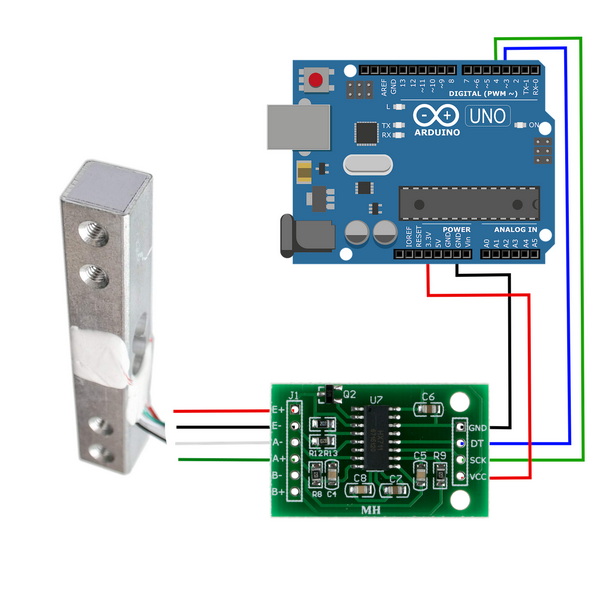
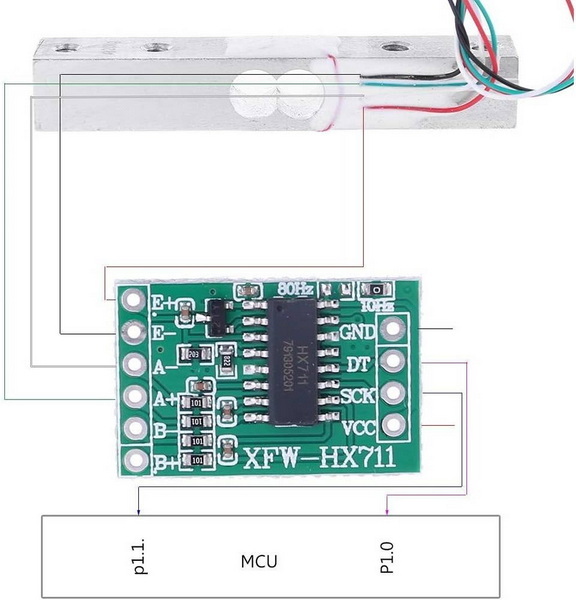
To connect the load cells to the HX711, follow this wiring diagram:

Step-by-Step Connection Guide
1. Connect Load Cells: Connect the four load cells in parallel. Each load cell has four wires: red (excitation+), black (excitation-), white (signal+), and green (signal-). Connect all red wires together, all black wires together, and so on.
2. Connect to HX711: Connect the combined wires to the HX711 module. The red wire goes to E+, black to E-, white to A+, and green to A-.
3. Connect HX711 to Microcontroller: Use jumper wires to connect the HX711 to your microcontroller. Connect the DT pin to a digital pin and the SCK pin to another digital pin.

Calibration of Load Cells with HX711
Importance of Calibration
Calibration is crucial for ensuring accurate weight measurements. It involves adjusting the system to account for any discrepancies in the load cell readings.
Calibration Process
1. Set Up the Load Cell: Place a known weight on the load cell.
2. Read the Output: Use the HX711 to read the output value.
3. Calculate the Calibration Factor: Divide the known weight by the output value to get the calibration factor.
Using Arduino with Load Cells and HX711
Setting Up Arduino
To use the HX711 with Arduino, you need to install the HX711 library. This library simplifies the process of reading data from the HX711.
Reading Weight Data
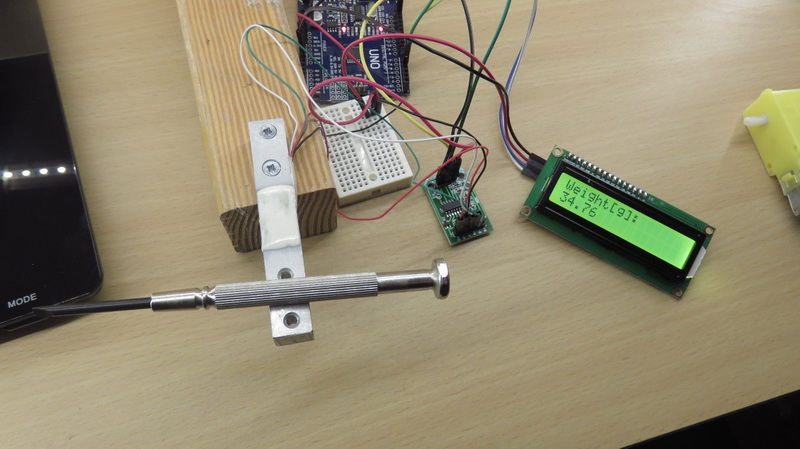
Once the setup is complete, you can read the weight data from the load cells. The output will be displayed in grams.
Troubleshooting Common Issues
Common Connection Problems
If you encounter issues with the connection, check the wiring to ensure all connections are secure and correctly placed.
Calibration Issues
If the readings are inconsistent, recalibrate the load cells and ensure that the known weight is accurate.
Signal Noise and Interference
To minimize signal noise, ensure that the wiring is kept away from sources of electromagnetic interference, such as motors or power supplies.
Practical Applications of Load Cells and HX711
Weighing Scales
Load cells and HX711 are commonly used in digital weighing scales, providing accurate weight measurements for various applications.
Industrial Applications
In industrial settings, load cells are used for monitoring loads on machinery, ensuring safety and efficiency.
DIY Projects
Many hobbyists use load cells and HX711 in DIY projects, such as smart scales and automated feeding systems.
Conclusion
Connecting four load cells to an HX711 is a straightforward process that can lead to the creation of highly accurate weighing systems. By understanding the components involved and following the proper connection and calibration procedures, you can achieve reliable weight measurements for various applications. The versatility of load cells and the HX711 makes them an excellent choice for both industrial and DIY projects.

Related Questions
1. What is the maximum load capacity of a load cell?
The maximum load capacity of a load cell varies depending on its design and specifications. Common capacities range from a few grams to several tons.
2. How do I choose the right load cell for my project?
Consider factors such as load capacity, accuracy, size, and environmental conditions when selecting a load cell for your project.
3. Can I use HX711 with other microcontrollers?
Yes, the HX711 can be used with various microcontrollers, including Arduino, Raspberry Pi, and ESP8266.
4. What are the common materials used in load cells?
Load cells are typically made from materials such as aluminum, stainless steel, and alloy steel, depending on the application requirements.
5. How do I ensure accurate readings from my load cell?
To ensure accurate readings, regularly calibrate the load cell, minimize environmental interference, and maintain proper wiring connections.

 Russia